

Descripción
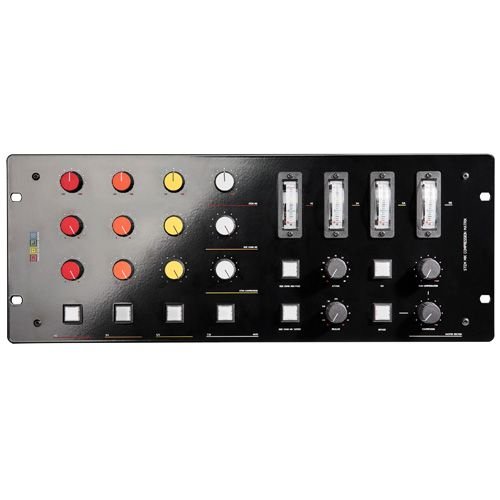
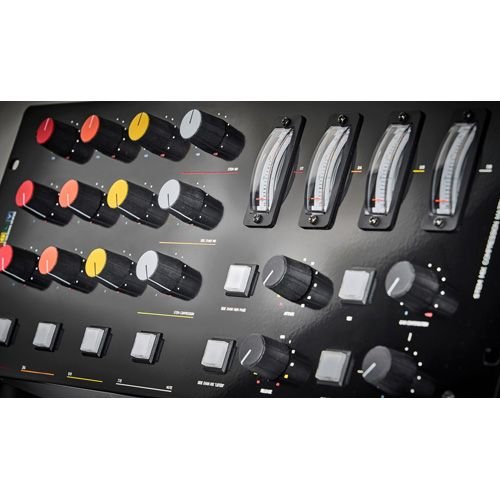
Recording Channel /w 500 series slot
Side Chain Emphasis EQ & listen
2 bands of Dynamic EQ/Wide Q/Compression modes
(Weiss A1 preamp not included)
The Circuit
The Tracking dock is a 500 series host, that will dock your preamp of choice, and merge them into the perfect
recording channel. You can swap the module to taste and application, from recording to recording, or just use your
favourite module statically.
The processing stage consists of a two equalization peak/bell filters, which will operate in the low/low mid spectrum,
and high mid/high spectrum respectively.
The dynamic sections on each filter will let you vary the attack and release times, as well as the dynamic hold, and
the soft/hard switch toggles between a more aggressive and subtle compression characteristic.
The Q on each bell goes so wide, that you can practically use the two bands for anything from individual, full band
compressors to do de-essing or notch out specific frequency.
Finally, there is a side chain boost EQ, with a narrow/wide boost and sweepable EQ available.
The Philosophy
The Tracking Dock was originally conceived, when we put a GOLY DAQ after a single, racked preamp in a tracking
situation and started rolling. We were floored by powerful it was, as a tool to capture the sound, as we wanted it, on
the way in.
If you want to dial in an almost finished sound while tracking, this is the tool that will get you there.
At first, we had idea was to pair the filters with a preamp in one package, and we went to a lot of iterations, listening
to the preamp/dynamics/EQ combo, to design the perfect preamp to go along with it.
When we reached the point where we had to make a decision between a few different designs that made it
favourably through the first design and listening stages, the thought of excluding one of the favourable choices just
felt wrong.
The idea of doing 3-4 different “docks” was brought to the table, but that also felt “off”, and with further brain
storming, the solution to add a 500 series module slot came up. This keeps the idea of the Tracking Dock a singular
entity intact, while leaving the preamp platform dynamic, and open to your choice of colour
The Frequency Bands
There are two bands of EQ, one limited to the lower end, the other limited to the higher end of the frequency
spectrum for the best distribution in terms of signal integrity.
Q
Q controls the width of the bells, and the widest is simply marked “Wide”, since it practically turns the band into a full
spectrum compressor.
Side Chain Emphasis
If you keep the side chain emphasis off, the side chain will function as usual. If you engage it, it will emphasise the
selected frequency, with a choice between a narrow and a wide Q setting.
…and to avoid “working blind”, or only listening for the effect of it, while you are dialing in the emphasis, you can
hold in the side chain emphasis listen function in the center section.
Please note: The Side Chain EQ topology is identical to the signal path, but there is a range of support circuitry that was not included for fidelity, the range is a bit stretched in terms of optimal noise performance,, and the spectrum is narrowed and manipulated a bit to accomodate for the HM/LM processing respectively. This means, the fidelity is considerably lower. You should keep this in mind, if you want to use the SC listen function creatively, or hold it in for processing.
Attack
The attack time of the dynamic processing. Note that the fastest setting is a little faster than what is possible in terms
of electrical processing, given that you have fast, reoccuring peaks. We did not want to “dumb down” or “cripple” the
range to keep it in a safe range, since this is really useful to catch transients, or even colour the sound on the way in
with a little harmonic distortion.
Release
The release time of the dynamic processing. The same goes for the fastest settings as for the attack, but here, the
pleasing artifacts, even when used heavy handedly, can be extremely pronounced.
Soft/Hard
● Soft setting is a very low (1:1.25) ratio/very soft knee ratio.
● Hard setting is a medium (1:5.5) ratio/medium soft knee ratio, with a subtle roll-off in the side chain.
Labelled soft/hard, because the change in settings affects the behaviour beyond the scope of just the ratio, and
hopefully inspires a different mindset and approach.
Dynamic Hold
Adjusts the (reverse) threshold for the dynamic hold on the respective bands.
Push buttons
● Emphasis Listen – hold for side chain listen.
● In – engage for processing.
Meter Calibration
● Turn on the unit, and leave it on for about 15 minutes to warm up.
● Set gain at 0, adjust internal ”bias” trimmer until needle sits on 0.
● Set gain at +5, adjust internal ”range” trimmer until needle sits on 5.
This can easily be done without the aid of a technician.
Reference/Control Voltage Calibration
For reference voltage adjustments, measure the +5/-5V points relative to the 0v point, clearly marked on the right
side of the PCB, and adjust the respective trimmers correspondingly.
This can be done without the aid of a technician, if you are comfortable handling a voltmeter.
Gain Calibration
Low
● Set Q to 1
● Set attack, release and dynamic hold full CCW
● Send a sine at 0dBU to the unit at 100Hz, set the band to low, adjust the frequency to 99Hz, and get a
relative output reading of 0dBU
● Now, set the gain to 5 dB, and check your output reading, while you adjust the internal gain trim for a
reading of 5 dBU.
● Roll the gain control back to -5 dB to check that the gain is symmetrical to a tolerance of 1% or better.
High
● Set Q to 1
● Set attack, release and dynamic hold full CCW
● Send a sine at 0dBU to the unit at 1K, set the band to high mid, adjust the frequency to 961Hz, and get a
relative output reading of 0dBU
● Now, set the gain to 5 dB, and check your output reading, while you adjust the internal gain trim for a
reading of 5 dBU.
● Roll the gain control back to -5 dB to check that the gain is symmetrical to a tolerance of 1% or better.


